Kapwing AI Review (2026): AI Video Editor Pricing, Pros & Cons
Bottom line
Kapwing AI is a Web SaaS tool for AI Video Editor (AI Video Repurposing & Shorts Editing) in Visual & Creative Media. Pricing: Free plan · $16–$50/mo. Best suited to Creators / Solo. Editor ratings: AI autonomy L2 (workflow copilot); moat score 3.4/5.0 (Workflow-embedded (strong)). Fact-checked by MarTechRadar Research Desk on Oct 5, 2026.
Cloud-native collaborative video editing and repurposing platform leveraging browser-based AI tooling for rapid multimedia content production.
Is Kapwing AI worth it in 2026? Buyer fit & when to walk away
Choose Kapwing AI if (Best Fit)
- Target ICP & Stack Fit: You operate as Creators / Solo requiring a Web SaaS deployment for AI Video Editor, with verified ecosystem connectivity for Stripe.
- L2 Architecture & Defensibility: High browser-based compute efficiency via optimized WebAssembly and cloud render pipelines, paired with early brand adoption across modern social media teams.
- Commercial Model Fit: Your procurement budget aligns with Free plan · $16–$50/mo and want a self-serve free tier for zero-cost initial validation.
Walk away from Kapwing AI if (Deal-Breakers)
- Walk away if your workflow cannot tolerate browser memory caps on 4k files: Editing long, multi-layer 4K video timelines inside a browser tab can hit local memory limits and slow cloud exports.
- Walk away if noisy audio subtitle errors is a deal-breaker for your team: Background music or overlapping speakers can cause transcript timing slips that need quick manual text fixes.
Kapwing AI pricing, free plan & scorecard at a glance
| Pricing | Free plan · $16–$50/moVendor pricing page |
|---|---|
| Free plan | Yes |
| Delivery | Web SaaS |
| Audience | Creators / Solo |
| AI autonomy level | L2 · Workflow copilotEditor-verified |
| Moat tier & score | 3.4 / 5.0 · Workflow-embedded (strong)Editor-verified |
| Funding | Series A |
| Total funding | $12.7MBacked by CRV, Kleiner Perkins |
| Founders | Eric Lu, Julia Enthoven |
| Company size | 11-50 employees |
| Ecosystem integrations | Stripe |
| Governance & docs | Changelog ↗ · Terms ↗ · Privacy ↗ |
| Headquarters | San Francisco, California |
| Founded | 2018 |
| Last verified | Oct 5, 2026 |
Kapwing AI pros & cons: strengths vs. operational limitations
Pros: core strengths & capabilities
- Text-prompt automated video generation and storyboard assembly
- Waveform-based audio inspection and automatic silence removal
- Automated multilingual subtitling: with custom styling engines
- Cloud-native collaborative timeline supporting: multi-editor workflows
Cons: operational limitations & risks
- Browser Memory Caps on 4K Files: Editing long, multi-layer 4K video timelines inside a browser tab can hit local memory limits and slow cloud exports.
- Noisy Audio Subtitle Errors: Background music or overlapping speakers can cause transcript timing slips that need quick manual text fixes.
- Stock B-Roll Mismatches: Auto-picked stock B-roll clips can sometimes look generic or clash with a brand's custom visual style.
Kapwing AI TCO & deal-breaker stress test
Simulate 12-month stepped TCO, hidden cost multipliers, contract lock-in exposure, and stack failure modes using only facts verified by MarTechRadar Research Desk on 2026-10-05 · Capture SHA da4c31f0.
Kapwing AI aligns with your 5-seat / $800/mo profile. Review the walk-away triggers and contract levers below before deployment.
- Moat Score
- 3.4 / 5.0
- AI Autonomy
- L2
- Free Tier / Trial
- Free plan
Triggered audit signals & failure modes
- Published Self-Serve Entry FloorVerified Pricing Ledger
Kapwing AI publishes a transparent entry point (Free plan · $16–$50/mo) with a free tier for initial validation before committing.
- Tier Fit for 5-Seat Scale: Pro ($16/mo)Verified Tier Schedule
For individuals and small groups looking to create more content in less time
- Primary Operational Bottleneck: Browser Memory Caps on 4K FilesAudit by MarTechRadar Research Desk
Editing long, multi-layer 4K video timelines inside a browser tab can hit local memory limits and slow cloud exports.
Test a custom Kapwing AI budget or stack constraint
Lower 5-seat floor (~$15/mo vs. $16 / mo)
Lower 5-seat floor (~$12/mo vs. $16 / mo)
Kapwing AI integrations, API, security & compliance stack
Kapwing AI AI moat & AI Video Editor positioning
High browser-based compute efficiency via optimized WebAssembly and cloud render pipelines, paired with early brand adoption across modern social media teams.
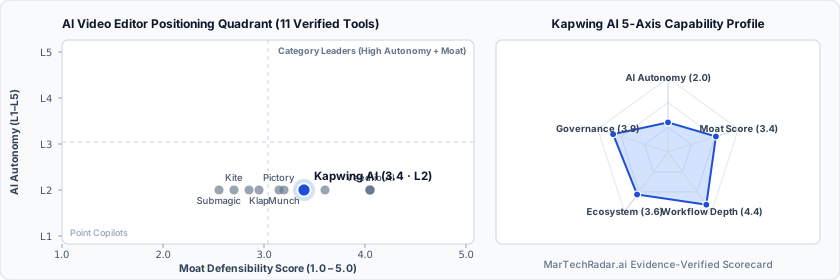
Kapwing AI in-depth review, pricing & architecture analysis
Editor sign-off: Oct 5, 2026. How profiles are made.
What is Kapwing AI? Overview & background
Founded in 2018 in San Francisco, California, and backed by $12.7M in Series A funding from CRV and Kleiner Perkins, Kapwing AI (kapwing.com) is a browser video editing and repurposing platform. It serves content marketing teams, social media managers, and growth agencies. The tool removes the need for heavy desktop editing software. Teams use Kapwing to cut, subtitle, and resize social videos right inside their web browser.
How Kapwing AI works: architecture & workflow
At Level 2 autonomy, Kapwing AI pairs a fast browser timeline powered by WebAssembly with cloud AI editing tools. Users upload raw video clips and transcribe spoken audio automatically so they can cut video by editing text transcripts. Smart Cut scans audio waveforms to snip out awkward pauses and dead air in seconds. At the same time, built-in AI tools add styled subtitles across languages, auto-resize aspect ratios, remove backgrounds, and drop in stock B-roll right on the shared team timeline alongside Stripe billing links.
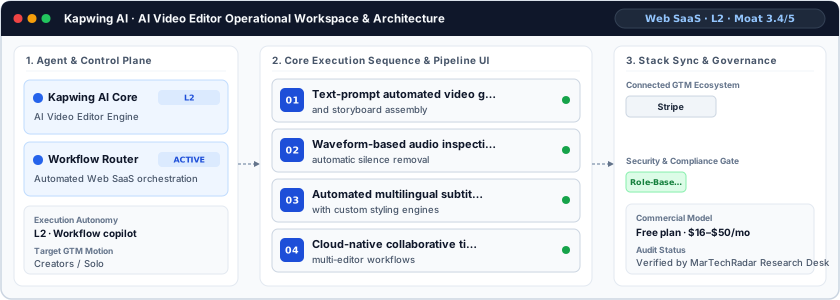
Kapwing AI limitations, drawbacks & risks
Key platform limits and trade-offs include:
- Browser Memory Caps on 4K Files: Editing long, multi-layer 4K video timelines inside a browser tab can hit local memory limits and slow cloud exports.
- Noisy Audio Subtitle Errors: Background music or overlapping speakers can cause transcript timing slips that need quick manual text fixes.
- Stock B-Roll Mismatches: Auto-picked stock B-roll clips can sometimes look generic or clash with a brand's custom visual style.
Kapwing AI pricing, plans & cost breakdown
Kapwing offers a Free plan ($0/month) with watermarked exports for testing, scaling to paid Pro and Business plans between $16 and $50/month based on billing cycle and usage needs. Paid tiers remove watermarks, unlock 4K exports, expand cloud storage, and raise monthly AI subtitling and dubbing minutes.
| Plan / Tier | Verified Price & Billing | Included Scope & Contract Terms |
|---|---|---|
| Free / Sandbox | $0 | Free plan or free tier offered by the vendor. |
| Pro | $16/mo | For individuals and small groups looking to create more content in less time |
| Business | $50/mo | For individuals and teams who need to supercharge their content creation workflow |
How Kapwing AI compares vs. competitors & alternatives
In the cloud video editing and repurposing market, Kapwing AI competes with Descript, Veed.io, OpusClip, and Canva Video. Descript focuses on desktop-style podcast and doc editing, while OpusClip focuses strictly on auto-clipping shorts. By contrast, Kapwing stands out as a flexible, browser-native timeline editor built for fast team sharing and social resizing.
Direct competitors & market radar
Top algorithmic competitors based on category positioning, capability overlap, and ICP alignment.
Frequently asked questions about Kapwing AI
How does Kapwing AI compare to Opus Clip and Brask AI in 2026?
Kapwing AI (Free plan · $16–$50/mo, Moat 3.9/5, L2 architecture) competes in AI Video Editor alongside Opus Clip (Free plan · $15–$29/mo, Moat 3.5/5.0), Brask AI (Custom / enterprise pricing, Moat 4.2/5.0), Descript (Free plan · $16–$65/mo · Enterprise plan, Moat 4.6/5.0). High browser-based compute efficiency via optimized WebAssembly and cloud render pipelines, paired with early brand adoption across modern social media teams.
What is the exact Kapwing AI pricing breakdown and tier structure for 2026?
Verified Kapwing AI pricing is Free plan · $16–$50/mo. Documented plan tiers include: Free / Sandbox ($0); Pro ($16/mo); Business ($50/mo). A permanent free tier is available for initial evaluation.
Verified sources & evidence trail
- Official product domain: https://kapwing.com
- Commercial pricing verification: https://www.kapwing.com/pricing
- Verified corporate entity profiles (
sameAs): LinkedIn Company Profile · Crunchbase Entity Record - First-party governance & documentation links: Changelog · Terms · Privacy
- Editor sign-off: Oct 5, 2026 (how profiles are made).
