Clipchamp Review (2026): AI Video Editor Pricing, Pros & Cons
Bottom line
Clipchamp is a Web SaaS tool for AI Video Editor (AI Video Repurposing & Shorts Editing) in Visual & Creative Media. Pricing: Custom / enterprise pricing. Best suited to DTC / eCommerce, Enterprise Brands and Creators / Solo. Editor ratings: AI autonomy L2 (workflow copilot); moat score 4.1/5.0 (Proprietary moat). Fact-checked by MarTechRadar Research Desk on Oct 16, 2026.
Browser-native video creation and editing platform leveraging WebAssembly processing, automated captioning, and Azure neural voice generation.
Is Clipchamp worth it in 2026? Buyer fit & when to walk away
Choose Clipchamp if (Best Fit)
- Target ICP & Stack Fit: You operate as DTC / eCommerce, Enterprise Brands and Creators / Solo requiring a Web SaaS deployment for AI Video Editor.
- L2 Architecture & Defensibility: Clipchamp's moat stems from its native operating system embedding within Windows 11 and Microsoft 365, paired with client-side WebAssembly video rendering that eliminates server-side ingest bottlenecks for standard video workloads.
- Commercial Model Fit: Your procurement budget aligns with Custom / enterprise pricing.
Walk away from Clipchamp if (Deal-Breakers)
- Walk away if you need published self-serve pricing: Clipchamp is sold by custom quote.
- Walk away if your workflow cannot tolerate client-side resource saturation: Because video rendering occurs primarily via client browser memory and local hardware acceleration, high-bitrate 4K footage or complex multi-track layering can trigger browser tab crashes, out-of-memory errors, and severe timeline scrubbing latency on standard corporate laptops.
- Walk away if multi-speaker diarization limits is a deal-breaker for your team: The smart subtitle generator lacks advanced acoustic diarization, requiring manual intervention to correct speaker attributions, punctuation anomalies, and domain-specific enterprise nomenclature across conversational or multi-stakeholder recordings.
Clipchamp pricing, free plan & scorecard at a glance
| Pricing | Custom / enterprise pricing |
|---|---|
| Free plan | No / not disclosed |
| Delivery | Web SaaS |
| Audience | DTC / eCommerce, Enterprise Brands, Creators / Solo |
| AI autonomy level | L2 · Workflow copilotEditor-verified |
| Moat tier & score | 4.1 / 5.0 · Proprietary moatEditor-verified |
| Funding | AcquiredAcquired by Microsoft |
| Total funding | $15M |
| Founders | Alexander Dreiling, David Hewitt, Tobias Raub |
| Company size | 10,001+ employees |
| Governance & docs | Changelog ↗ |
| Headquarters | Brisbane, QLD |
| Founded | 2014 |
| Last verified | Oct 16, 2026 |
Clipchamp pros & cons: strengths vs. operational limitations
Pros: core strengths & capabilities
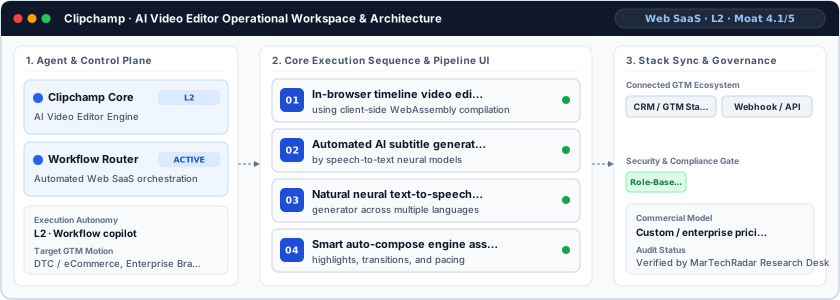
- In-browser timeline video editor: using client-side WebAssembly compilation
- Automated AI subtitle generator powered: by speech-to-text neural models
- Natural neural text-to-speech voiceover: generator across multiple languages
- Smart auto-compose engine assembling: highlights, transitions, and pacing
Cons: operational limitations & risks
- Client-Side Resource Saturation: Because video rendering occurs primarily via client browser memory and local hardware acceleration, high-bitrate 4K footage or complex multi-track layering can trigger browser tab crashes, out-of-memory errors, and severe timeline scrubbing latency on standard corporate laptops.
- Multi-Speaker Diarization Limits: The smart subtitle generator lacks advanced acoustic diarization, requiring manual intervention to correct speaker attributions, punctuation anomalies, and domain-specific enterprise nomenclature across conversational or multi-stakeholder recordings.
- Collaborative Versioning Constraints: Unlike collaborative document tooling within Microsoft 365, Clipchamp restricts simultaneous real-time multi-user timeline editing, forcing distributed video teams into sequential project file checkouts and manual export reconciliation.
Clipchamp TCO & deal-breaker stress test
Simulate 12-month stepped TCO, hidden cost multipliers, contract lock-in exposure, and stack failure modes using only facts verified by MarTechRadar Research Desk on 2026-10-16.
Clipchamp triggers high-severity friction under your 5-seat / $800/mo constraints. Benchmark the verified subtrack alternatives below before committing.
- Moat Score
- 4.1 / 5.0
- AI Autonomy
- L2
- Free Tier / Trial
- None disclosed
Triggered audit signals & failure modes
- Opaque Enterprise Quoting vs. SMB/Mid-Market BudgetVerified Pricing Ledger
Clipchamp does not disclose a public self-serve floor (Custom / enterprise pricing). Buyers with a $800/mo cap face high sales-qualification friction.
- Sales-Gated Contract TermsFact-checked by MarTechRadar Research Desk
Pricing is available on request through tailored enterprise sales quotes, with custom enterprise tiers structured around organizational scale, user seats, and workflow volume.
- Primary Operational Bottleneck: Client-Side Resource SaturationAudit by MarTechRadar Research Desk
Because video rendering occurs primarily via client browser memory and local hardware acceleration, high-bitrate 4K footage or complex multi-track layering can trigger browser tab crashes, out-of-memory errors, and severe timeline scrubbing latency on standard corporate laptops.
Test a custom Clipchamp budget or stack constraint
Lower 5-seat floor (~$16/mo vs. Custom Quote) · Transparent self-serve entry without mandatory annual lock-in
Lower 5-seat floor (~$16/mo vs. Custom Quote) · Transparent self-serve entry without mandatory annual lock-in
Clipchamp AI moat & AI Video Editor positioning
Clipchamp's moat stems from its native operating system embedding within Windows 11 and Microsoft 365, paired with client-side WebAssembly video rendering that eliminates server-side ingest bottlenecks for standard video workloads.
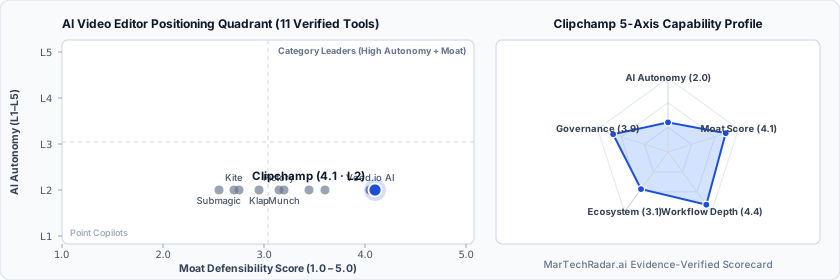
Clipchamp in-depth review, pricing & architecture analysis
Editor sign-off: Oct 16, 2026. How profiles are made.
What is Clipchamp? Overview & background
Operating within the broader Microsoft productivity ecosystem, Clipchamp provides in-browser video manipulation and automated assembly designed to displace heavyweight desktop non-linear editing software for corporate communication. Headquartered in Brisbane, QLD, the company was founded in 2014 and secured $15M in venture financing before being acquired by Microsoft to serve as the default media composition layer across Windows 11 and enterprise suites. The software targets non-technical enterprise creators, internal communications managers, and growth marketers who require rapid social video assembly without the steep learning curves of professional editing suites.
How Clipchamp works: architecture & workflow
At its architectural core, Clipchamp runs on client-side WebAssembly (Wasm), offloading decoding, timeline compositing, and rendering directly to the local browser engine and device GPU rather than routing raw media assets through centralized transcode servers. The platform functions at an L2 autonomy level: users supply source assets, while rule-based heuristics and automated models execute specific tasks like scene cutting, rhythm-matched audio syncing, and layout reformatting. Automated speech-to-text modules generate time-coded subtitles locally or via Azure Cognitive Services, while its integrated neural voice synthesis pipeline converts plain text into multi-language narration tracks directly on the multitrack timeline.
Clipchamp limitations, drawbacks & risks
Operational considerations and platform boundaries include:
- Client-Side Resource Saturation: Because video rendering occurs primarily via client browser memory and local hardware acceleration, high-bitrate 4K footage or complex multi-track layering can trigger browser tab crashes, out-of-memory errors, and severe timeline scrubbing latency on standard corporate laptops.
- Multi-Speaker Diarization Limits: The smart subtitle generator lacks advanced acoustic diarization, requiring manual intervention to correct speaker attributions, punctuation anomalies, and domain-specific enterprise nomenclature across conversational or multi-stakeholder recordings.
- Collaborative Versioning Constraints: Unlike collaborative document tooling within Microsoft 365, Clipchamp restricts simultaneous real-time multi-user timeline editing, forcing distributed video teams into sequential project file checkouts and manual export reconciliation.
Clipchamp pricing, plans & cost breakdown
Pricing is available on request through tailored enterprise sales quotes, with custom enterprise tiers structured around organizational scale, user seats, and workflow volume.
| Plan / Tier | Verified Price & Billing | Included Scope & Contract Terms |
|---|---|---|
| Enterprise / Custom | Custom quote | Custom-quoted plan; terms come from the vendor's sales team. |
How Clipchamp compares vs. competitors & alternatives
Clipchamp competes against browser-first editors such as Descript, Kapwing AI, and Kite. While Descript focuses on text-driven transcript editing with deep podcasting workflows and Kapwing AI prioritizes rapid collaborative social-media meme and short-form creation, Clipchamp differentiates on zero-friction Microsoft tenant integration, native enterprise data compliance, and local asset processing. It remains the optimal solution for IT-regulated workforces standardizing internal corporate comms, training modules, and social cuts on managed Windows hardware.
Frequently asked questions about Clipchamp
Does Clipchamp publish pricing or require an enterprise quote?
Clipchamp pricing: Custom / enterprise pricing. No free plan is publicly disclosed. Pricing is available on request through tailored enterprise sales quotes, with custom enterprise tiers structured around organizational scale, user seats, and workflow volume.
What are the top Clipchamp alternatives in AI Video Editor?
Verified AI Video Editor alternatives include Descript (Free plan · $16–$65/mo · Enterprise plan), Kapwing AI (Free plan · $16–$50/mo), Klap (From $14/mo), Cardboard ($5–$250/mo). Clipchamp competes against browser-first editors such as Descript, Kapwing AI, and Kite.
What are the main limitations and trade-offs of Clipchamp?
Operational considerations and platform boundaries include: Client-Side Resource Saturation: Because video rendering occurs primarily via client browser memory and local hardware acceleration, high-bitrate 4K footage or complex multi-track layering can trigger browser tab crashes, out-of-memory errors, and severe timeline scrubbing latency on standard corporate laptops. Walk away if you need published self-serve pricing: Clipchamp is sold by custom quote.
Verified sources & evidence trail
- Official product domain: https://clipchamp.com
- Commercial pricing verification: Verified against official vendor pricing policy (Custom / enterprise pricing)
- Verified corporate entity profiles (
sameAs): LinkedIn Company Profile · Crunchbase Entity Record - First-party governance & documentation links: Changelog
- Editor sign-off: Oct 16, 2026 (how profiles are made).
